Azure
cecli can connect to the OpenAI models on Azure.
First, install cecli:
python -m pip install cecli-dev
Then configure your API keys and endpoint:
# Mac/Linux:
export AZURE_API_KEY=<key>
export AZURE_API_VERSION=2024-12-01-preview
export AZURE_API_BASE=https://myendpt.openai.azure.com

# Windows
setx AZURE_API_KEY <key>
setx AZURE_API_VERSION 2024-12-01-preview
setx AZURE_API_BASE https://myendpt.openai.azure.com
# ... restart your shell after setx commands
Start working with cecli and Azure on your codebase:
# Change directory into your codebase
cd /to/your/project

cecli --model azure/<your_model_deployment_name>

# List models available from Azure
cecli --list-models azure/
Note that cecli will also use environment variables
like AZURE_OPENAI_API_xxx.
The cecli --list-models azure/ command will list all models that cecli supports through Azure, not the models that are available for the provided endpoint.
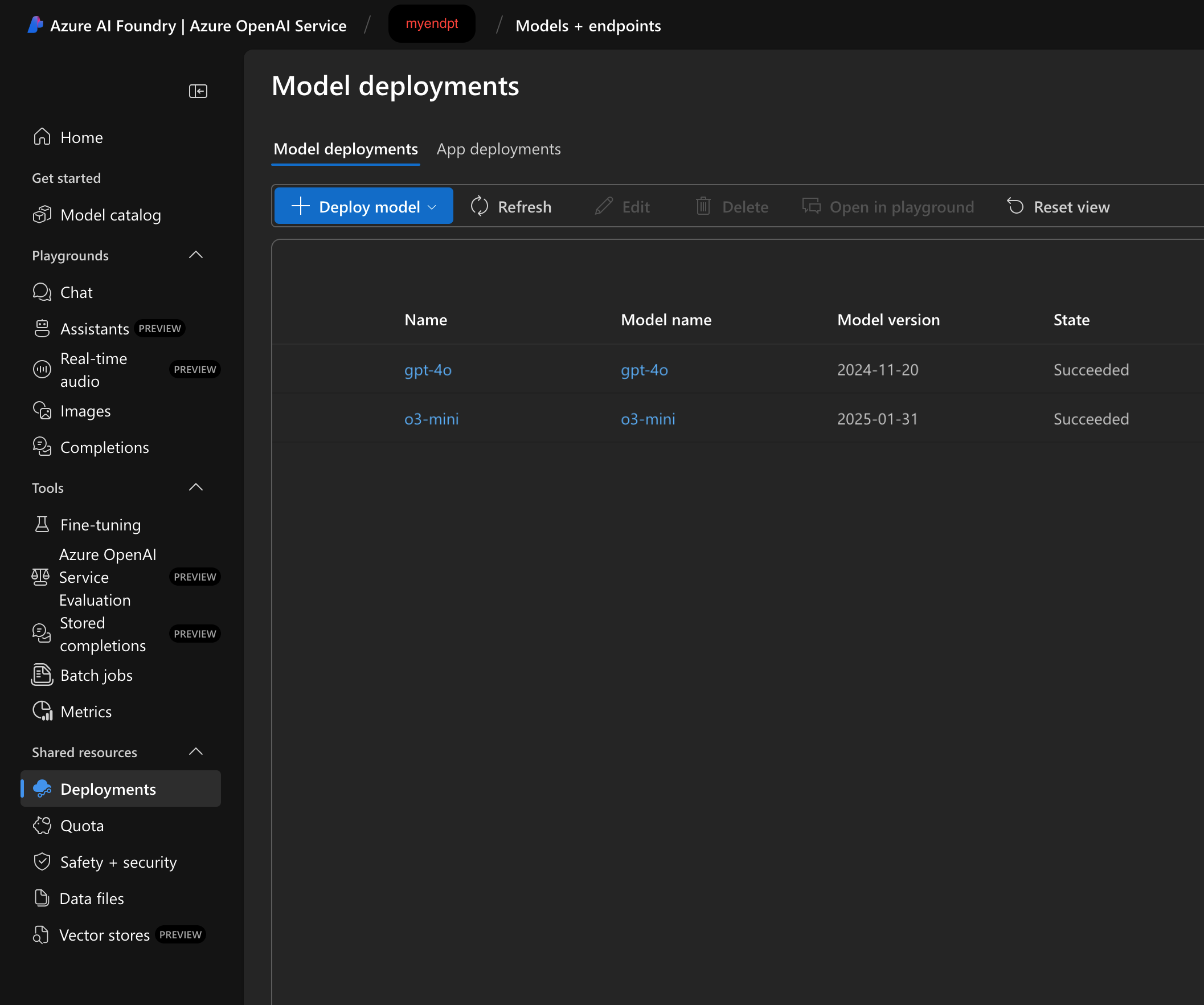
When setting the model to use with --model azure/<your_model_deployment_name>, <your_model_deployment_name> is likely just the name of the model you have deployed to the endpoint for example o3-mini or gpt-4o. The screenshow below shows o3-mini and gpt-4o deployments in the Azure portal done under the myendpt resource.